Feedback
Over the course of my project I was able to acquire feedback from different sources, such as from family, tutors and fellow students.
My family are very interested in 3D games and art in general, the feedback from them that I got was that my work fit very well with the post-apocalyptic theme and that most of the models were of a very high standard.
Some issues were pointed out by my family and fellow colleagues, such as some UV's and polygons were overlapping each other, making some models appear darker than they should or appear to have small gaps, though I was able to address some of these concerns, some were quite awkward to mend.
Throughout my project I received constant feedback from my tutors, in general they though my work fit well with the theme and they gave me constant feedback on my production and helpful tips on what to change and better ways of doing certain things, such as applying textures.
All of the feedback I received was very helpful to me and helped me to create a final product that fits in with my selected theme and consists of models and assets with little faults and of a good near professional standard.
Evaluation
To begin with I saw this assignment as quite a tough challenge due to my limited abilities in modelling in 3D, though as I progressed through this assignment by planning and scheduling before doing any real practical work, I actually found it a lot easier to develop my skills even further, by documenting what exactly I was doing and learning to identify and fix mistakes or issues within either the 3D modelling software, or the 3D game engine.
My objective for this assignment was to create a 3D environment based on a design pack and to try and lay out a detailed plan so if someone else was to view it they could create the same 3D models and environment as me. I think I was quite successful in this field, due to the amount of detailed plan drawings, detailed descriptions and explanations. By doing this I was able to create a clear set of instructions of what models need to be created and how they are to be placed within the the 3D environment.
The theme I chose to base my 3D environment on was a Post-Apocalyptic theme, I chose this because I wanted to test my ability to develop models and an environment on this specific type of theme, especially because I have never done so before. It was interesting to develop models keeping in mind the specific theme and trying to ensure that they looked relative to the theme.
Overall I am very happy with my final product, it fits in with the theme perfectly, all the models for with the theme and with adding assets such as moving water and animation, I have created a product that Is more interesting than one full of solely static objects.
Friday, 28 November 2014

Production Schedule/Tracking
Below you can see my tracking schedule, in which I charted my progress every two weeks to ensure I was completing my work at a fast rate and in time with my deadline for the assignment.
Production log
Below is my full production log in which I have gone through the production of my 3D environment step by step, from start to finish.
Below you can see my tracking schedule, in which I charted my progress every two weeks to ensure I was completing my work at a fast rate and in time with my deadline for the assignment.
Production log
Below is my full production log in which I have gone through the production of my 3D environment step by step, from start to finish.
Design pack and legal and ethical check
Design Pack
City Layout
Below are sketches of how my city will be laid out within the game engine when I am placing all of the models.The city will be laid out with 3 columns of buildings side by side with 22 buildings on each column laid out on each of the nine platforms exactly as they are laid out below.

Below is a more detailed city layout, detailing aspects of the environment besides the buildings. 9 pavements will be modeled and surrounded by roads that outline a rectangle shaped island. The small island will be surrounded by swimmable water with large rock type objects scattered throughout.

Building Models
Below are sketches of individual models of building that will be featured in my city. Some of the buildings featured in my 3D environment will not be created to be accessed by the player, meaning they will not be able to venture inside certain buildings as they will be sealed off from the outside and will not have any actual inside structure modeled.
In total there will be 66 buildings throughout my game environment, only 50% (33) will be accessible by the player, this will add a sense of mystery to the environment.
As you can see in the city layout above, there will be 22 buildings on each of the 3 columns going from the top to the bottom. I will model the first column of 3 sets of buildings and then copy them over to the next to columns, 22 buildings on the middle column and 22 on the right column, totaling at 66 buildings with 11 accessible and 11 inaccessible buildings per column.
There are four different types of buildings, one tall square buildings that will consist of 7 floors, a wider tall rectangular building that will consist of 6 floors, another rectangular building that will contain only 1 floor and a last building that only has one floor that form above resembles a square attached to a large rectangle as you can see below. The inaccessible buildings will feature less floors to add variation in size, the tall buildings will feature a texture showing 5 floors and the wide building will feature a texture representing 3 floors.
In Lightwave Modeller I will model the basic outlines of these building using primitive cube and cuboid shapes made with the box tool under the create tab.

Below is a more detailed example of how the square 7 story tall buildings will look and what the inside will contain based off 3 different floors stacked on top of each other, The bottom floor will consist of a reception room with a desk, an elevator that is on all floors leading to the top floor, and smaller details like sofas, chairs and ceiling lights.
The second, fourth and sixth floor will consist of a set of stairs on either side of the rooms, the one on the second floor on the left side will be leading from the reception floor, the one on the right side will lead to the third floor, this room will consist of fairly empty cubicles laid out to the left side on this floor. On the fourth floor the room will be laid out the same as the second floor and the 6th floor will be laid out the same as the second and forth. The third, fifth and 7th floor will be laid out the same as the second fourth and sixth though the cubicles will be more to the right side of the rooms and the 7th floor won have a set of stairs leading to the roof.
Each of the tall buildings I will be modelling will feature windows and door ways, which I will cut out of the building shapes so I can insert transparent windows and doors on the accessible buildings models. I will do this by placing a cube or cuboid half way through the walls of the buildings and then use the spbool subtract function in lightwave modeler which removes the covered area without taking away any necessary polygons from the infrastructure. By doing this I will be identifying points in which doors and windows will be needed to be placed.


To the left is a sketch of the rectangular tall wide building that will feature six floors, the layout for this building is the same as for the square tall building, though there is one less floor and the building is wider.
To model this, all that is needed to do is to duplicate the tall square building, take away the top floor and ensure there is no stairs leading to the roof and then duplicate that model of the six floor building and put another copy directly next to that one, so they resemble one entire wide building.
 To the left is the design layout for the smaller buildings that will be featured in my 3D environment, one single floored rectangular/cuboid shaped one and one that resembles a cuboid with a cube/square shaped part of the building attached to the back when seen from above. Each building resembles a store inside with shelves and a counter, the counter just in the more rectangular building along with shelves and shelves alone in the other. Each building has an entrance which will be programmed to open on approach which I will model in Lightwave and animate in UDK.
Billboard Models
Below are sketches of individually sized billboards that will be featured in my city, which I will be texturing with my own 2D images, hopefully featuring cartoonized versions of myself. These billboards will be randomly placed on top o different buildings, there is no set place for these to be but they are best suited on the inaccessible buildings so they do not clash with the infrastructure of the buildings with an accessible inside. I have determined the size of 3 billboard models, though they can be altered to fit any textured image.

Billboard Texture Sketches


Other Models
Below are a series of different models that will also be featured in my city. The street light model below will produce light to certain areas, with some of them not working and will be placed randomly near the edge of pavements, just before the road.

T
he dumpster model below will be designed in modeller and featured mainly at the back of buildings, altering in the colors blue and green and as well as an upright model I will create an overturned model.

Below are basic sofa and chair models that will be featured in the reception rooms of the tall buildings placed facing each other at the left and right side of each reception room. They will be textured in a variety of textures, some appearing more worn and damaged than others.

Below are models for benches and doors, the benches will be designed and textured to resemble a standard bench and will be placed between and around buildings with some overturned.

The door models are fairly basic, two textured upright rectangles that will open automatically on approach when I animate them in UDK. I will animate them so when they are approached, each upright textured rectangular door will move to the left or right into the walls of the accessible buildings when approached by the player when they enter a certain distance infront of the building.
Below is a detailed model from above of the office cubicles, six individual cubicles will be placed on each floor above the reception floors in the tall buildings, 3 to one side of the room with a slight gap and then 3 more cubicles will be placed next to them with the entrances to the cubicles on the left or right facing each other for access, possibly to be used as cover for enemy fire.
Below is a rough model of stairs, that as detailed in my floor layout sketches, will be featured on either side of all rooms besides the top floor leading to the roof for access to each floor on the building.

Textures
Back of billboard texture 1

Billboard base/back texture 1

Billboard base/back texture 2

Billboard texture 1

Billboard texture 2

Billboard texture 3

Door texture 1

Tall/tall and wide building texture (to be fitted according to number of floors in building)

Small building textures


Legal and ethical check-list
City Layout
Below are sketches of how my city will be laid out within the game engine when I am placing all of the models.The city will be laid out with 3 columns of buildings side by side with 22 buildings on each column laid out on each of the nine platforms exactly as they are laid out below.
Below is a more detailed city layout, detailing aspects of the environment besides the buildings. 9 pavements will be modeled and surrounded by roads that outline a rectangle shaped island. The small island will be surrounded by swimmable water with large rock type objects scattered throughout.
Building Models
Below are sketches of individual models of building that will be featured in my city. Some of the buildings featured in my 3D environment will not be created to be accessed by the player, meaning they will not be able to venture inside certain buildings as they will be sealed off from the outside and will not have any actual inside structure modeled.
In total there will be 66 buildings throughout my game environment, only 50% (33) will be accessible by the player, this will add a sense of mystery to the environment.
As you can see in the city layout above, there will be 22 buildings on each of the 3 columns going from the top to the bottom. I will model the first column of 3 sets of buildings and then copy them over to the next to columns, 22 buildings on the middle column and 22 on the right column, totaling at 66 buildings with 11 accessible and 11 inaccessible buildings per column.
There are four different types of buildings, one tall square buildings that will consist of 7 floors, a wider tall rectangular building that will consist of 6 floors, another rectangular building that will contain only 1 floor and a last building that only has one floor that form above resembles a square attached to a large rectangle as you can see below. The inaccessible buildings will feature less floors to add variation in size, the tall buildings will feature a texture showing 5 floors and the wide building will feature a texture representing 3 floors.
In Lightwave Modeller I will model the basic outlines of these building using primitive cube and cuboid shapes made with the box tool under the create tab.
Below is a more detailed example of how the square 7 story tall buildings will look and what the inside will contain based off 3 different floors stacked on top of each other, The bottom floor will consist of a reception room with a desk, an elevator that is on all floors leading to the top floor, and smaller details like sofas, chairs and ceiling lights.
The second, fourth and sixth floor will consist of a set of stairs on either side of the rooms, the one on the second floor on the left side will be leading from the reception floor, the one on the right side will lead to the third floor, this room will consist of fairly empty cubicles laid out to the left side on this floor. On the fourth floor the room will be laid out the same as the second floor and the 6th floor will be laid out the same as the second and forth. The third, fifth and 7th floor will be laid out the same as the second fourth and sixth though the cubicles will be more to the right side of the rooms and the 7th floor won have a set of stairs leading to the roof.
Each of the tall buildings I will be modelling will feature windows and door ways, which I will cut out of the building shapes so I can insert transparent windows and doors on the accessible buildings models. I will do this by placing a cube or cuboid half way through the walls of the buildings and then use the spbool subtract function in lightwave modeler which removes the covered area without taking away any necessary polygons from the infrastructure. By doing this I will be identifying points in which doors and windows will be needed to be placed.
To the left is a sketch of the rectangular tall wide building that will feature six floors, the layout for this building is the same as for the square tall building, though there is one less floor and the building is wider.
To model this, all that is needed to do is to duplicate the tall square building, take away the top floor and ensure there is no stairs leading to the roof and then duplicate that model of the six floor building and put another copy directly next to that one, so they resemble one entire wide building.
To the left is the design layout for the smaller buildings that will be featured in my 3D environment, one single floored rectangular/cuboid shaped one and one that resembles a cuboid with a cube/square shaped part of the building attached to the back when seen from above. Each building resembles a store inside with shelves and a counter, the counter just in the more rectangular building along with shelves and shelves alone in the other. Each building has an entrance which will be programmed to open on approach which I will model in Lightwave and animate in UDK.Billboard Models
Below are sketches of individually sized billboards that will be featured in my city, which I will be texturing with my own 2D images, hopefully featuring cartoonized versions of myself. These billboards will be randomly placed on top o different buildings, there is no set place for these to be but they are best suited on the inaccessible buildings so they do not clash with the infrastructure of the buildings with an accessible inside. I have determined the size of 3 billboard models, though they can be altered to fit any textured image.
Billboard Texture Sketches
Other Models
Below are a series of different models that will also be featured in my city. The street light model below will produce light to certain areas, with some of them not working and will be placed randomly near the edge of pavements, just before the road.
T
he dumpster model below will be designed in modeller and featured mainly at the back of buildings, altering in the colors blue and green and as well as an upright model I will create an overturned model.
Below are basic sofa and chair models that will be featured in the reception rooms of the tall buildings placed facing each other at the left and right side of each reception room. They will be textured in a variety of textures, some appearing more worn and damaged than others.
Below are models for benches and doors, the benches will be designed and textured to resemble a standard bench and will be placed between and around buildings with some overturned.
The door models are fairly basic, two textured upright rectangles that will open automatically on approach when I animate them in UDK. I will animate them so when they are approached, each upright textured rectangular door will move to the left or right into the walls of the accessible buildings when approached by the player when they enter a certain distance infront of the building.
Below is a detailed model from above of the office cubicles, six individual cubicles will be placed on each floor above the reception floors in the tall buildings, 3 to one side of the room with a slight gap and then 3 more cubicles will be placed next to them with the entrances to the cubicles on the left or right facing each other for access, possibly to be used as cover for enemy fire.

Below is a rough model of stairs, that as detailed in my floor layout sketches, will be featured on either side of all rooms besides the top floor leading to the roof for access to each floor on the building.
Textures
Back of billboard texture 1
Billboard base/back texture 1
Billboard base/back texture 2
Billboard texture 1
Billboard texture 2
Billboard texture 3
Door texture 1
Tall/tall and wide building texture (to be fitted according to number of floors in building)
Small building textures
Legal and ethical check-list
Setting research
Chosen Setting: Post-apocalyptic modern city
Games with similar modern feel:
These are all images that have a similar visual look to how I would like my setting to look, though these settings are fairly clean I will alter my setting to appear more relevant to a post apocalyptic theme.
Mirrors Edge
Mirrors Edge has a very close correlation to how I would like my city to look by the end of my project, it is not too detailed or overly complicated, so it will be very easy to model and design.


Assassins Creed in present time
Assassins Creed is perhaps a more detailed and advanced setting as it has a lot more attention to detail and is a lot more realistic.


Out of the two settings I have compared, I think I will related my project and models more to Mirrors Edge as the style of the setting and individual models is a lot more appealing to me and it will be a fun experiment to make a similar setting and make it have a lot more of a darker theme to it.
Movies:
Gamer
One movie comes to mind when I think of modern environments, and that specific movie is Gamer, it is a film based around modern environments as it is set slightly in the future, in a time where games are played by controlling real people and the player controls them throughout a range of different environments. As with the games that I have looked to for inspiration, the theme of this movie is not a post apocalyptic one, so I am looking to it for inspiration with the layout and general style, though I will alter my 3D environment to appear more post apocalyptic with a lot more damaged textures and a less clean look.


Mind map

Moodboard

Games with similar modern feel:
These are all images that have a similar visual look to how I would like my setting to look, though these settings are fairly clean I will alter my setting to appear more relevant to a post apocalyptic theme.
Mirrors Edge
Mirrors Edge has a very close correlation to how I would like my city to look by the end of my project, it is not too detailed or overly complicated, so it will be very easy to model and design.
Assassins Creed in present time
Assassins Creed is perhaps a more detailed and advanced setting as it has a lot more attention to detail and is a lot more realistic.

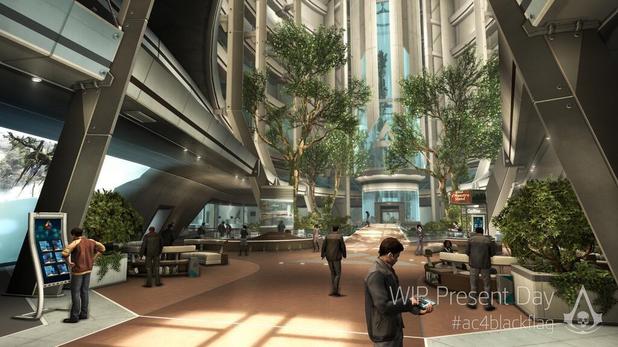
Out of the two settings I have compared, I think I will related my project and models more to Mirrors Edge as the style of the setting and individual models is a lot more appealing to me and it will be a fun experiment to make a similar setting and make it have a lot more of a darker theme to it.
Movies:
Gamer
One movie comes to mind when I think of modern environments, and that specific movie is Gamer, it is a film based around modern environments as it is set slightly in the future, in a time where games are played by controlling real people and the player controls them throughout a range of different environments. As with the games that I have looked to for inspiration, the theme of this movie is not a post apocalyptic one, so I am looking to it for inspiration with the layout and general style, though I will alter my 3D environment to appear more post apocalyptic with a lot more damaged textures and a less clean look.
Mind map
Moodboard
Subscribe to:
Comments (Atom)